Manufactured for:
2View, LLC
1369 Haven Lane
Moneta, VA 24121
This is not a sterile device.
Instructions:
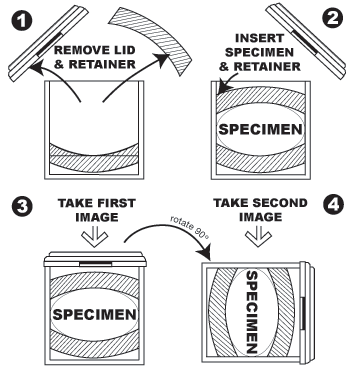
The proper way to use the 2View Specimen Mammography Container is for the surgeon to oversee the placement of the specimen in the operating room. The surgeon ensures the specimen is oriented properly, that the retention is sufficient to hold the specimen in place during rotation, and that the specimen is not distorted by any compression. Once the specimen is properly placed in the 2View, it can be moved to the imaging device, imaged in two or more planes, and forwarded to pathology without any manipulation. The images taken through the 2View can be analyzed by the surgeon and the radiologist to determine if the margins are sufficient or more tissue has to be removed. After mammographic analysis, the container is used to transport the untouched specimen to pathology for further analysis.
Step By Step Instructions:
- Remove 2View Specimen Mammography Container from its plastic packaging.
- Open the container by removing the snap fit lid.
- Remove the upper foam rubber retainer from the container.
- Ensure the lower foam rubber retainer is in place at the bottom of the container.
- Insert Specimen into the container, on top of the lower foam rubber retainer.
- Insert the upper foam rubber retainer by pressing it into the container and overcoming the interference fit.
- Lower the foam rubber retainer to the point that it gently but securely contacts the specimen.
- Release the retainer and check the strength of the interference fit to ensure the retainer will not move.
- Place the lid on the device and make note of the orientation of the lid to the specimen. The container can be marked with grease pencil or permanent marker to show margin orientation.
- Place the container in an imaging device. Imaging device settings will vary based on specimen size and device specifications. In a standard mammography unit, automatic exposure control should be turned off and manual settings used. Low KVA rates are generally required (somewhere around 24) and the MAS settings are often in the 16 range. But since no two specimens are exactly the same, there is no standard setting that can be advised for all specimens.
- Take the first view of the specimen.
- Rotate the device 90 degrees vertically. Take the second view of the specimen.
- The two views can be compared to get a 3 dimensional analysis of the specimen’s margins. The grid, which appears in the upright image and is visible on the lid, helps in identifying close margins and areas of interest for the pathologist.
- Stand the device upright and transport it to Pathology.
- In Pathology, after noting areas of interest, remove the lid.
- Gently remove the foam rubber retainer from the device. (If the specimen is going to be kept in the container until pathologic analysis at a later time, preservative fluid can be added to the container without disturbing the specimen.)
- Remove the specimen and perform pathology as normal.
- Discard all parts of the specimen container in accordance with biohazard disposal procedures.
|
|
|